Splicer
A probabilistic cut-and-effects machine. Splicer slices whatever passes through it in time with your song, then repeats, reverses, re-pitches, tape-stops and reorders the slices, and throws filters, crushers, drive, gates, echoes and reverb at them. You design the cuts as patterns, or let the generator write them by chance inside bounds you set, then string patterns together into a song.
- BBCut-style cut engine
- 5 cut procedures on a strict grid
- 6 effect lanes with range knobs
- Repeatable randomness
- 16 editable patterns and a song chain
- Hand-played gestures and MIDI
- Tempo synced
- AU · VST3 · Standalone
Quick start
From install to mangled breaks in a minute.
Insert it
Put Splicer on a drum loop, a bus or a whole mix and press play in your DAW. Splicer follows the song's tempo and position.
Watch the map
The phrase map shows the pattern playing: pink for repeats, blue for reversed ones, amber ramps for tape stops and starts.
Generate
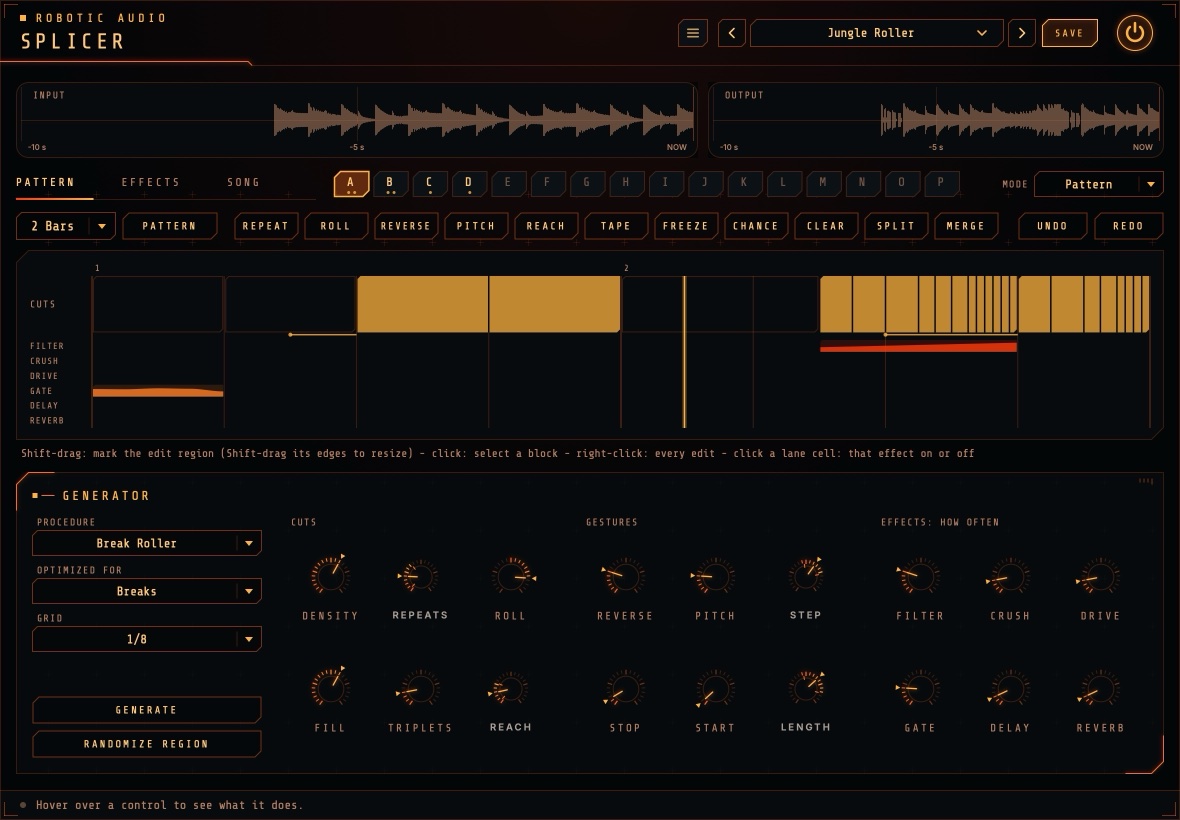
On the PATTERN page, choose a Procedure and set the Generator panel's knobs, then press GENERATE: the generator writes a new pattern into the selected slot. Press again for another.
Edit it
On the PATTERN page, Shift-drag to mark a region and add or clear gestures, or randomize just that part.
Make a song
Fill more slots, then chain them on the SONG page and set Mode to Song.
Play it by hand
Hold STUTTER, REVERSE, TAPE STOP or FREEZE, or play them from a MIDI keyboard.
The window
What's where.
- Header
- The preset bar, the power button (bypass) and the menu (three lines) with this manual, About and the website.
- Displays
- The last 10 seconds in (with markers where a cut reads from: RPT repeats, REV reversed, TAPE tape stops and starts, FRZ freeze) and out. They stay on every page.
- Pages, patterns, mode
- On every page, one row: the page tabs, the sixteen patterns A to P (click one to select it) and the MODE menu, Pattern or Song (see Modes).
- PATTERN page
- The selected pattern's editor, with the Generator panel below it: the pattern's recipe (how it's cut, which gestures, how often each effect is used), GENERATE and RANDOMIZE REGION. See Patterns and The generator.
- EFFECTS page
- The phrase map (what plays, effects included), how each of the six effects sounds (motion and two ranges) and Perform: Chaos, the seed, Mix and the gestures played by hand.
- SONG page
- The chain of patterns Song mode plays.
- Tooltip bar
- Along the bottom: point at any control to see what it does.
Signal flow
A recorder, a cut engine and a fixed chain of effects.
Everything that comes in is first written into a 30-second history. The cut engine then plays from it: while a block plays live it reads the sample that has just arrived, so nothing changes; during a cut it reads from wherever the plan says, forwards, backwards, faster, slower, or from further back in time. Every jump is crossfaded, so cuts don't click.
The engine's output runs through the effect lanes in a fixed order: filter, crush, drive, gate, then the delay and reverb throws. A lane only does anything while it is on for the block playing; switching fades over a few milliseconds. The delay and reverb are sends: sound goes in while the lane is on, and the tails ring out across the blocks that follow.
Mix blends the dry input with all of this. The drive is oversampled, which delays the sound by a few samples; Splicer reports this to your host, which compensates for it.
Chance, seeds & repeatability
Random, but the same every time.
Chance works in two places. The generator uses it to write patterns: GENERATE (and RANDOMIZE on the PATTERN page) draws a fresh seed every time, so each press writes something new, inside the bounds of the pattern's recipe (the Generator panel). And a pattern's blocks can have a chance of happening each time round, drawn from the seed and the song position: play bar 17 twice and you hear the same thing twice, and a bounce matches what you heard.
- Seed
- Shown under Chaos: which way the blocks' chances fall. REROLL picks a new one at random. It's saved with your session and in presets, and can be automated. 1 – 9999
- Settings
- The generator draws its own random numbers for each decision, so changing one setting changes only what it controls: with the same seed, turning up Reverse makes more blocks reversed, but the cuts themselves stay where they were.
The generator
The engine: how the phrase is sliced.
- Recipes
- The Generator panel under the editor on the PATTERN page shows the selected pattern's recipe: each pattern keeps its own settings, so a breaks pattern and a sparse glitch pattern sit side by side. Select another pattern and the panel shows its recipe; turn a knob and it's that pattern's recipe now (undo brings back the old one). GENERATE writes the whole pattern from it, RANDOMIZE REGION only the edit region; each press draws a fresh seed.
- Procedure
- The rules for slicing the phrase into blocks and repeats (see Procedures).
- Optimized For
- Leans everything towards your material without changing how anything works. Breaks: tight 2.5 ms crossfades, busy cutting. Mix / Bus: longer blocks, fewer repeats, more delay and reverb throws, less crushing. Melodic: smooth 12 ms crossfades, longer blocks, more reverse, pitch, tape and reverb, less gating. Performance: few automatic cuts and effects, so you can play the gestures by hand.
- Grid
- The step the cutting patterns are made of. Every block starts on it: at 1/8 (the default) every cut falls on an 8th note. Reach and the hand-played stutter are counted in it too. 1/4, 1/8, 1/16
- Density
- How many blocks are cut; the rest play live. Where a block starts matters: the phrase's first beat nearly always comes through clean, bar downbeats are cut less, and cutting builds up through the last bar. 0 – 100 %
- Repeats
- A range knob: how many times a cut block is repeated, picked inside the range for every cut and moved to the nearest count that divides the block musically: 1, 2, 4, 8 or 16 (a block of three units: 1, 3, 6 or 12). The repeats share the block's length: at the default of 2, a quarter-note block plays an 8th note twice. 1 – 16
- Roll
- How often a cut becomes a roll: 8ths, then 16ths, then 32nds, each taking half of what's left (repeats of a block). Rolls happen mostly in the phrase's last bar. Negative values slow down instead (32nds to 8ths). −100 – +100 %
- Fill
- The chance a phrase ends with a fill: its last half or quarter bar becomes a roll (or now and then a tape stop), leading into the next phrase. 0 – 100 %
- Triplets
- The chance a cut divides into threes (3, 6 or 12 repeats) instead. Turn it to 0 for none. 0 – 100 %
- Reach
- A range knob: how far back, in beats, the repeats come from. At 0 a block repeats its own start: the first repeat is the live sound, the rest replay it. Further back plays music from earlier in the history, which reorders the song. 0 – 8 beats
Never ahead of time
Splicer has no latency, so it can only play what has already been heard. Where a cut would need audio from the future (a reversed repeat of a block that has only just begun, or a pitched-up repeat that would run past "now"), its source moves back in time just far enough. The result: a reversed block at Reach 0 plays the audio just before the block backwards.
Procedures
Five ways to slice a phrase, after Nick Collins's BBCut.
Each procedure cuts the phrase with patterns of eight grid units (a bar of 8ths at the default grid), chosen at random from its own set, so blocks always tile the bar and land on the beat.
| Procedure | Patterns (grid units) | Character |
|---|---|---|
| Break Roller | 3+3+2 (most often), 2+2+2+2, 4+2+2, 2+2+4, 4+4, 2+3+3 | Jungle's tresillo feel. |
| Warp | 4+4, 8 | Long blocks; rolls stretch across them. |
| SQ Pusher | 2+2+2+2, 1+1+2+2+2, 2+2+1+1+2, 1+1+1+1+2+2 | Frantic: cuts more often, with twice as many repeats. |
| Sparse Glitch | 8, 4+4 | Cuts rarely, about a third as often, but tape stops, starts and reverses are twice as likely. |
| Straight | 2+2+2+2 | Even, predictable blocks: stutters exactly on the beat. |
Melodic and Mix / Bus double every block's length (patterns of 16 units).
Gestures
What a cut block does.
A cut block is a tape stop, a tape start or (most often) a run of repeats. Repeats can also be reversed and pitched.
- Reverse
- The chance that a cut plays its repeats backwards. 0 – 100 %
- Pitch
- The chance that a cut's repeats step in pitch, each one by another Pitch Step: up for rising rolls, down for falling ones. The first repeat keeps the original pitch. Pitch changes with speed, like tape, from two octaves down to one up. 0 – 100 %
- Pitch Step
- A range knob: the semitones added per repeat, always whole semitones. −12 – +12 st
- Tape Stop
- The chance that a cut block slows down to a standstill instead of repeating, then stays silent until the next block. 0 – 100 %
- Tape Start
- The chance that a cut block starts from standstill and spins up to speed. 0 – 100 %
- Tape Length
- A range knob: how much of the block the stop or start takes, in quarters of the block. 10 – 100 %
Effect lanes
Six effects that fire by chance, block by block.
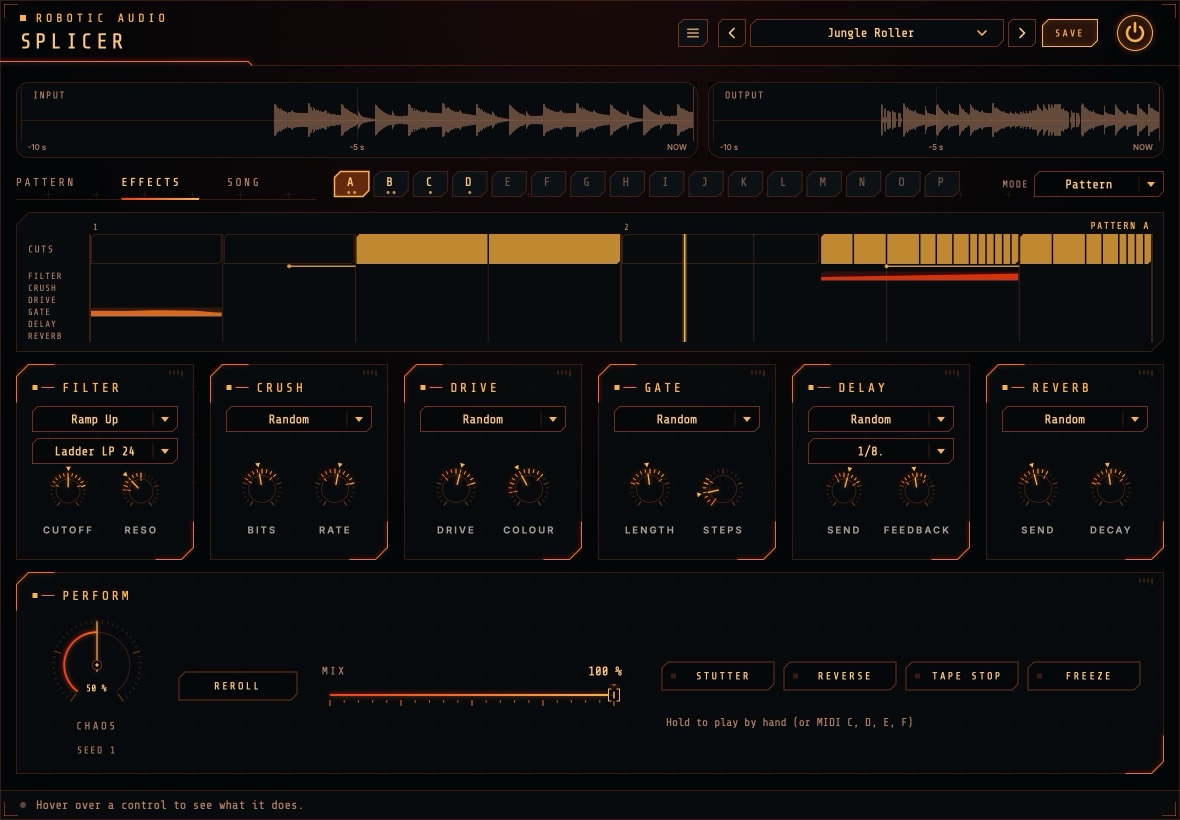
How each effect sounds is set on the EFFECTS page: its Motion (how its values move during a block) and two range knobs that bound those values. Where it plays is in the pattern: switch it on or off per block by clicking its lane row in the editor, or let the generator do it: the Generator panel's Effects: how often knobs say on how many blocks it switches each effect on.
| Lane | First range | Second range | Extra |
|---|---|---|---|
| Filter | Cutoff, 40 Hz – 18 kHz | Resonance | Filter type: all 14 of the suite's filters (ladders, SVF, diode, MS-20, formant, combs, phaser) |
| Crush | Bits, 1 – 16 | Sample rate, 400 Hz – 44.1 kHz | |
| Drive | Drive amount | Colour: saturation → overdrive → distortion → fuzz | Oversampled 4× |
| Gate | Length: the share of each slice that's open | Steps: slices per repeat, 1, 2, 3, 4, 6 or 8 | Follows the repeats (or grid units in a live block) |
| Delay | Send | Feedback, 0 – 95 % | Delay time in notes, 1/32 to 1/2, dotted and triplet |
| Reverb | Send | Decay, 0.3 – 12 s | Splicer's large algorithmic reverb |
The delay and reverb are throws: the block's sound goes in while the lane is on, and the echoes and tail carry on over the blocks that follow, mixed on top of the sound.
Motion & ranges
Bounded randomness.
A range knob sets a range, not a value: drag it to move the range, Shift-drag (or Shift-scroll) to make it wider or narrower, double-click to reset. A lit dot on the ring shows where the value is right now, while the lane is playing.
| Motion | During a block |
|---|---|
| Hold | One random value inside the range, held. |
| Ramp Up | From the bottom of the range to the top: a rising filter sweep. |
| Ramp Down | From the top to the bottom. |
| Walk | A smooth random wander through the range. |
| Steps | A new random value for every repeat. |
| Alternate | Flips between the two ends of the range with every repeat. |
| Random | One of the above, chosen anew for every block. |
Both of a lane's controls follow the same motion, each with its own random values.
Modes
What plays.
The MODE menu, at the right of the page tabs, decides which pattern the cut engine plays. Everything after that (the history, the gestures you play by hand, the effect lanes' motions and ranges, Chaos and Mix) works the same in both modes.
| Mode | What plays |
|---|---|
| Pattern | The selected pattern loops, in step with the song. Choosing another pattern (on the PATTERN page, by automating the Pattern parameter, or with a MIDI note from C1 to D#2) switches at the next bar line. |
| Song | The chain on the SONG page plays from the song's start, looping at its end. |
Both follow the song position, so playing a section again or bouncing it gives the same result. Chaos scales the blocks' chances: at 50 % they're as set; turn it down and fewer blocks happen.
Patterns
Cuts you design, keep and play.
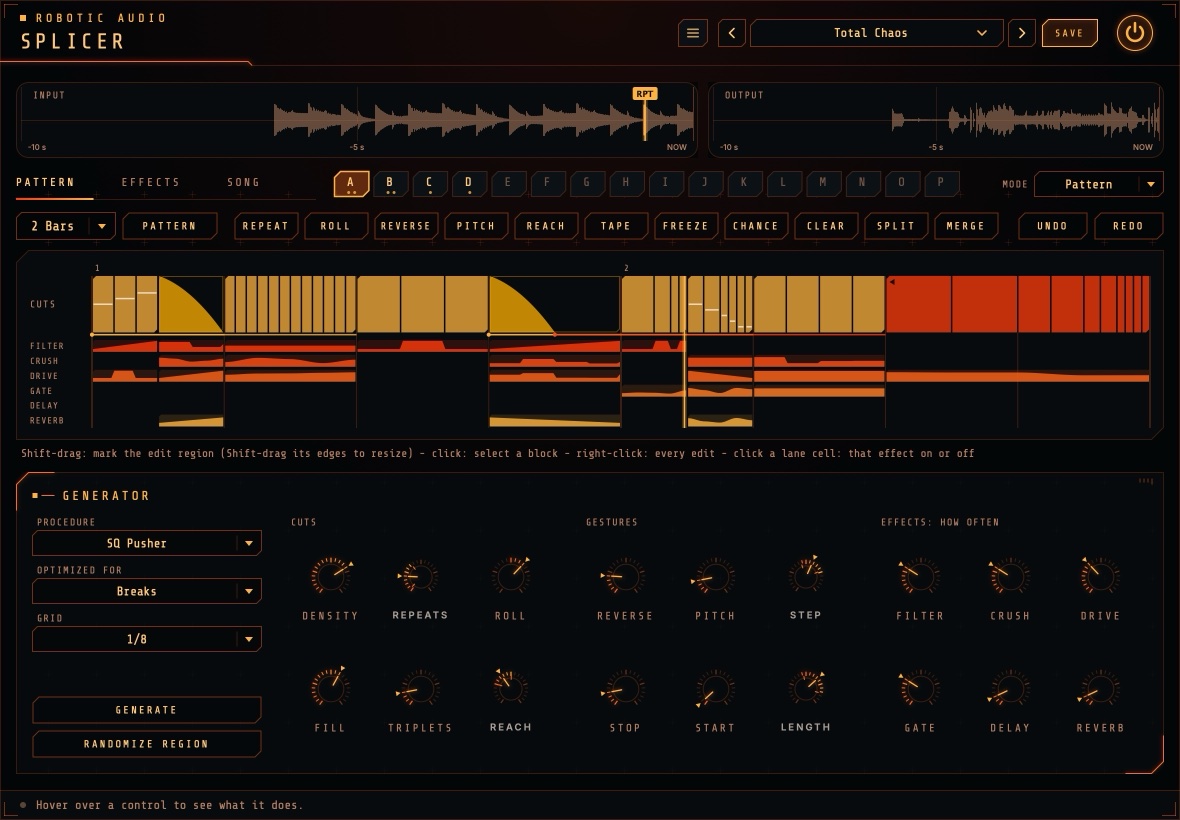
The PATTERN page edits sixteen patterns, A to P. A pattern is 1, 2 or 4 bars of blocks on a grid of 16th notes: each block plays live or is cut, may switch effect lanes on, and has a chance of happening. Click a slot to edit it (in Pattern mode it also starts playing at the next bar line); slots holding something show a dot per bar.
Selecting
As in the envelope editor, Shift-drag across the timeline to mark the edit region; it snaps to the Grid (1/8 by default). With Shift held, drag either edge of the region to resize it. A plain click selects the block under the mouse, Cmd+A selects everything and Esc selects nothing.
Edits
| Edit | What it does to the selection |
|---|---|
| Repeat | Plays it as 1, 2, 3, 4, 6, 8 or 16 equal repeats: two repeats over a quarter note are two 8ths. |
| Roll | A roll: 8ths, then 16ths, then 32nds, each taking half of what's left (or slowing down; or in triplets). |
| Reverse | Plays its repeats backwards (a live block becomes one reversed repeat). Again to turn it off. |
| Pitch | Each repeat a step higher or lower: ±1, 2, 3, 5, 7 or 12 semitones. |
| Reach | Takes the repeats from an 8th, a beat, two beats or a bar further back: reorders the music. |
| Tape | A tape stop or start, over the whole block or its first quarter, half or three quarters. |
| Freeze | Holds a 1/32 note from just before the selection as a sustained tone. |
| Chance | How often its blocks (and their effects) happen: 100, 75, 50 or 25 %. Drawn from the seed and the pass, so repeatable; Reroll changes the outcome. |
| Clear | Back to live, effects off (Delete). |
| Randomize | The generator fills only the edit region (or, with nothing marked, the whole pattern) using the pattern's recipe, with a fresh seed each time. |
| Split / Merge | Cuts blocks at the selection's edges, or joins the selection into one block. |
| Copy / Paste | Cmd+C and Cmd+V (pastes at the selection's start, between patterns too). |
| Undo / Redo | Cmd+Z and Cmd+Shift+Z, 100 steps, patterns and chain alike. |
Every edit is in the toolbar and in the right-click menu. Click a cell in a lane row to switch that effect on or off for the block under it (or for the whole selection, if you click inside it); the lane's motion and ranges stay as set on the EFFECTS page. An effect moves the same way in a block every time round (as the editor draws it), and editing one region never changes the effects anywhere else; only the blocks' chances fall anew on each pass.
Generate, length and files
- Generate
- The generator writes a whole new pattern into the slot (as long as it is), from the Generator panel's settings (the pattern's recipe), with a fresh seed each press: the cutting rules (strict grid, a clean first beat, fills at the end) all apply. Not what you wanted? Press again, or undo.
- Length
- 1, 2 or 4 bars. New bars play live; bars past the new end are dropped.
- Pattern menu
- Save or load the pattern, copy, paste or clear it; save or load the whole bank (all sixteen patterns and the chain); load the demo bank; open the Patterns folder. Files go to a Patterns folder next to your presets.
Song
Patterns strung together into a performance.
The SONG page holds the chain that Song mode plays: a row of steps, each a pattern played a number of times, optionally ending with a fill.
- Pattern
- Click the big letter to choose the step's pattern.
- Repeats
- − and + set how many times it plays (1 to 32); the tile shows how many bars that is.
- Fill
- Click to choose a pattern that replaces the end of the step's last pass: a one-bar fill pattern plays over its last bar. Longer fills play their last bars.
- Step menu
- Click the tile (or right-click) to insert a step before it, duplicate, move it left or right, or delete it; the cross deletes too.
- Add Step
- Puts the pattern being edited at the end.
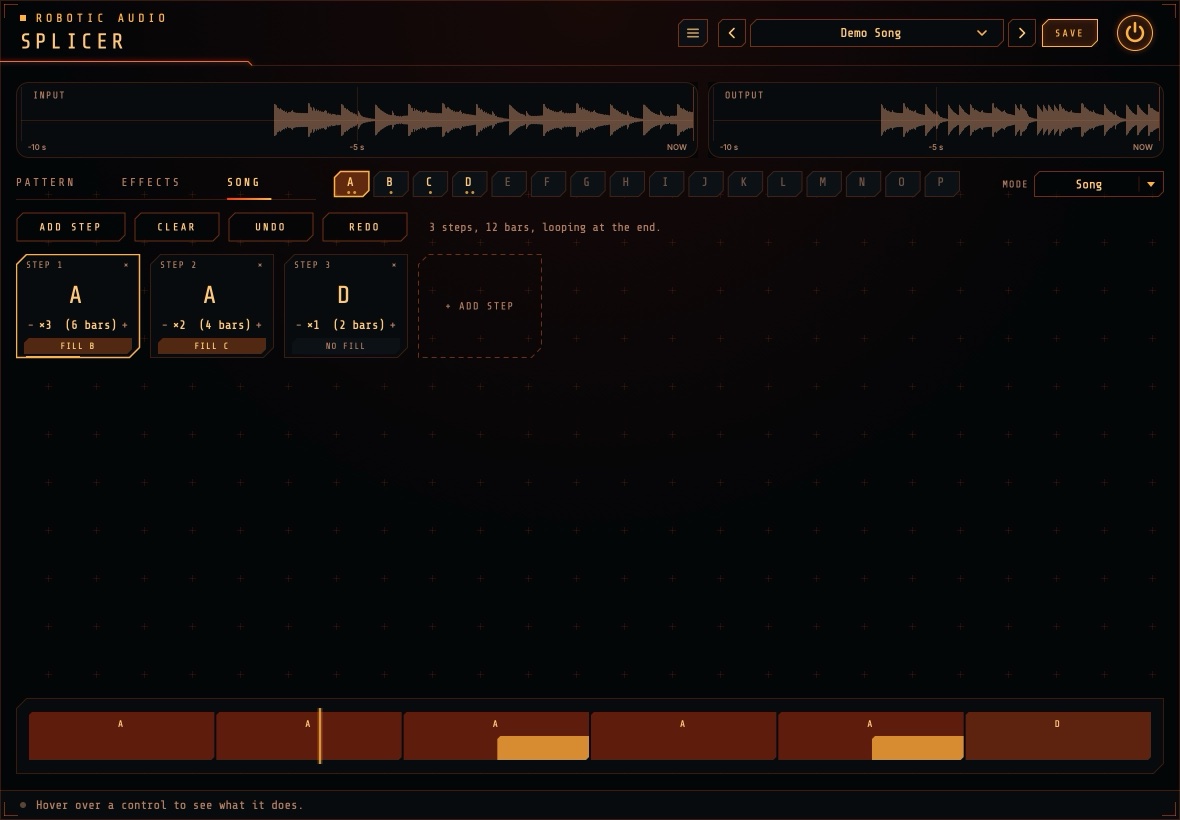
Underneath, the timeline shows the whole song in proportion, every pass of every step with the fills at their ends, and a playhead. The chain follows the song position from bar 1 and loops at its end, so a 12-bar chain plays bars 1-12, then again from bar 13.
Perform
The big knob and the buttons, on the EFFECTS page.
- Chaos
- Scales the blocks' chances as they play (and, when generating, every chance and range width). At 50 % everything is as set; lower, fewer blocks happen; at 100 % every chance is doubled. 0 – 100 %
- Reroll
- A new seed: the blocks' chances fall another way.
- Stutter
- While held, repeats one grid unit from the moment you pressed.
- Reverse
- While held, plays the history backwards from the moment you pressed.
- Tape Stop
- While held, slows to a standstill (in just over a beat) and stays silent.
- Freeze
- While held, loops the last 1/32 note (at least 30 ms) with long crossfades: a sustained, frozen tone.
- Mix
- The dry input against Splicer's output. 0 – 100 %
Hand-played gestures take over from the plan while held (the newest press wins) and crossfade back on release; the effect lanes keep following the plan. The buttons are host parameters: automate them to place gestures exactly. Like all momentary buttons in the suite, they're never stored in presets or sessions.
MIDI
Choose patterns and play the gestures from a keyboard or pads.
Send MIDI to Splicer (in most DAWs: route a MIDI track to it, or load it as a MIDI-controlled effect).
| Notes | What they do | Velocity |
|---|---|---|
| C1 – D#2 (36 – 51) | Choose patterns A – P. In Pattern mode the new one starts at the next bar line. | |
| C (any other octave) | Stutter, while held | Soft: two grid units · medium: one · hard: half a unit |
| D | Reverse, while held | Above 100: double speed, an octave up |
| E | Tape Stop, while held | Harder stops faster: from two beats down to a quarter of a beat |
| F | Freeze, while held |
Notes are sample-accurate. In the standalone app, the keyboard strip under the window plays them too.
The display
Seeing the chaos.
The phrase map shows the pattern playing (its letter at the top right), numbered by bar, with a line per beat and a playhead running through it. In the CUTS row, outlined blocks play live; filled ones are cut: pink for repeats (with a line between repeats), blue with a back arrow for reversed repeats, amber ramps for tape stops and starts. A small staircase shows pitched repeats, and a line running left from under a block shows how far back its repeats are taken from.
Below, a row per effect lane shows the blocks the lane fires on, with the movement of its first control (cutoff, bits, drive, length, send) drawn as a curve through the block.
The map always shows exactly what plays this time round (blocks whose chance didn't come up show as live), and it updates the moment you edit or change a setting.
Presets & bypass
The header every Robotic Audio plugin shares.
- Preset bar
- Previous, next, the preset list (with Save As, Delete and Open Folder) and SAVE. Presets store every setting, the seed, the mode, the sixteen patterns and the chain included.
- Factory presets
- Default, Jungle Roller, SQ Fill Frenzy, Tape Ghost, Bus Throws, Lo-Fi Stutter, Melodic Smear, Hands On, Demo Song (Song mode, playing the demo bank's chain) and Total Chaos. Each brings its own patterns: two grooves (A, B) and two fills (C, D), chained.
- Power
- Bypasses the plugin with a short, click-free crossfade.
Ideas
Things to try.
Break Roller on a break at 170 BPM, Roll at 60 %, Fill at 80 %, Reach 0 to 2 beats: instant jungle edits with a roll into every phrase.
Automate the seed: one value per chorus, another per verse. Each section gets its own pattern.
Mix / Bus on the master with Density at 0; automate Density up for the last bar before a drop.
Delay chance high, Send range 60 – 100 %, Feedback around 70 %, motion Hold: echoes thrown from random blocks.
Melodic, Sparse Glitch, Tape Stop and Reverse up, Reverb chance 40 %: slowly falling, swelling textures.
Performance, with C, D, E and F on pads: stutters, reverses, stops and freezes, by hand.
Specifications
The numbers.
| Property | Value |
|---|---|
| History | 30 seconds, stereo |
| Generator | Patterns of 1, 2 or 4 bars (4/4) on a grid of 1/4, 1/8 or 1/16 |
| Repeats | 1, 2, 4, 8, 16 (triplets 3, 6, 12) per block; rolls up to 32; none shorter than a 1/64 note |
| Crossfades | 2.5 – 12 ms by material, on every jump |
| Pitch | Varispeed, −24 to +12 semitones |
| Latency | A few samples (the drive's 4× oversampling), reported to the host |
| Tail | Up to 14 seconds (delay and reverb) |
| CPU at rest | Rests once silence has come in for longer than a cut can reach back and the tails have died away |
| Patterns | 16 per bank, 1, 2 or 4 bars on a 16th-note grid, up to 64 blocks each; a chain of up to 64 steps |
| Formats | AU, VST3, Standalone; takes MIDI |